Memory-Efficient
JSON Processing
TerseJSON's Proxy skips full deserialization. Access 3 fields from a 21-field object — only 3 fields materialize in memory. Plus 30-80% smaller payloads.
npm install tersejsonMemory Efficiency with Lazy Proxy
Binary formats require full deserialization. TerseJSON's Proxy only expands keys on-demand - saving memory for the fields you never access.
Memory Usage: 1,000 Records x 21 Fields
Measured with --expose-gc, forcing garbage collection between tests
| Fields Accessed | Normal JSON | TerseJSON Proxy | Memory Saved |
|---|---|---|---|
| 1 field | 6.35 MB | 4.40 MB | 31% |
| 3 fields (list view) | 3.07 MB | ~0 MB | ~100% |
| 6 fields (card view) | 3.07 MB | ~0 MB | ~100% |
| All 21 fields | 4.53 MB | 1.36 MB | 70% |
Why ~0 MB / ~100% savings?
The Proxy is so lightweight that accessing partial fields triggers garbage collection of unused data. The original compressed payload stays in memory, keys are translated on-demand without creating intermediate objects.
Perfect For
CMS List Views
Title + slug + excerpt from 20+ field objects
Dashboards
Large datasets, aggregate views
Mobile Apps
Memory constrained, infinite scroll
E-commerce
Product listings from 30+ field objects
Protobuf requires full deserialization. TerseJSON doesn't.
Fetch everything, render what you need, pay only for what you access.
The Proxy Does Less Work, Not More
Critics assume TerseJSON adds overhead. Let's address the common misconceptions.
"Every memory operation takes processing time"
True — but TerseJSON does FEWER memory operations. JSON.parse creates objects for all 21 fields. Proxy only translates the 3 you access.
"Alias map is a memory allocation nightmare"
The key map is a single object with ~20 entries (~200 bytes). Compare that to 21,000 property allocations for 1000 objects x 21 fields.
"JSON.stringify & JSON.parse are heavy operations"
We use the SAME JSON.parse — but on a smaller string (180KB vs 890KB). Smaller string = faster parse. The Proxy wrapper is O(1).
"Adding more overhead for 15-25% savings"
This assumes we ADD overhead. We REDUCE it. Lazy expansion means work is deferred/skipped entirely for unused fields.
Tracing the Actual Operations
Standard JSON.parse
Parse 890KB string
Allocate 1000 objects x 21 fields = 21,000 properties
Access 3 fields per object
GC collects 18,000 unused properties
TerseJSON Proxy
Parse 180KB string (smaller = faster)
Wrap in Proxy (O(1), ~0.1ms)
Access 3 fields = 3,000 properties created
18,000 properties NEVER EXIST
Run the benchmark yourself:
node --expose-gc demo/memory-analysis.jsSee It In Action
Watch how TerseJSON transforms your API responses in real-time. Try different data types to see the compression in action.
[
  {
    "firstName": "John",
    "lastName": "Doe",
    "emailAddress": "john@example.com",
    "phoneNumber": "+1-555-0101",
    "createdAt": "2024-01-15",
    "updatedAt": "2024-03-20"
  },
  {
    "firstName": "Jane",
    "lastName": "Smith",
    "emailAddress": "jane@example.com",
    "phoneNumber": "+1-555-0102",
    "createdAt": "2024-02-20",
    "updatedAt": "2024-03-18"
  },
  {
    "firstName": "Bob",
    "lastName": "Wilson",
    "emailAddress": "bob@example.com",
    "phoneNumber": "+1-555-0103",
    "createdAt": "2024-03-01",
    "updatedAt": "2024-03-21"
  }
]{
"__terse__": true,
"v": 1,
"k": {
"a": "firstName",
"b": "lastName",
"c": "emailAddress",
"d": "phoneNumber",
"e": "createdAt",
"f": "updatedAt"
},
"d": [
{
"a": "John",
"b": "Doe",
"c": "john@example.com",
"d": "+1-555-0101",
"e": "2024-01-15",
"f": "2024-03-20"
},
{
"a": "Jane",
"b": "Smith",
"c": "jane@example.com",
"d": "+1-555-0102",
"e": "2024-02-20",
"f": "2024-03-18"
},
{
"a": "Bob",
"b": "Wilson",
"c": "bob@example.com",
"d": "+1-555-0103",
"e": "2024-03-01",
"f": "2024-03-21"
}
]
}Network Bonus: Smaller Payloads Too
Memory efficiency is the main feature — but you also get 30-80% smaller network payloads.
Save 70-80% instantly — easier to add than configuring compression middleware.
Stack TerseJSON on top for 15-25% additional savings.
TerseJSON pays for itself in cloud egress costs alone.
| Scenario | Original | With TerseJSON | Savings |
|---|---|---|---|
| 100 users, 10 fields | 45 KB | 12 KB | 73% |
| 1000 products, 15 fields | 890 KB | 180 KB | 80% |
| 10000 logs, 8 fields | 2.1 MB | 450 KB | 79% |
Test Your JSON
Paste your JSON data below to see exactly how much TerseJSON can compress it. Get instant verification that your data works perfectly.
{
  "__terse__": true,
  "v": 1,
  "k": {
    "a": "userId",
    "b": "firstName",
    "c": "lastName",
    "d": "emailAddress",
    "e": "isActive",
    "f": "createdAt"
  },
  "d": [
    {
      "a": 1,
      "b": "John",
      "c": "Doe",
      "d": "john@example.com",
      "e": true,
      "f": "2024-01-15"
    },
    {
      "a": 2,
      "b": "Jane",
      "c": "Smith",
      "d": "jane@example.com",
      "e": true,
      "f": "2024-02-20"
    }
  ]
}auserIdbfirstNameclastNamedemailAddresseisActivefcreatedAtWhy TerseJSON?
Built for production. Designed for developers.
Zero Code Changes
Drop-in middleware and client wrapper. Your existing code works unchanged.
Transparent Proxies
Client-side proxies let you access data with original keys. No expansion needed.
TypeScript Ready
Full TypeScript support with generics. Type safety throughout.
Built-in Analytics
Track compression stats, bandwidth savings, and per-endpoint performance.
REST & GraphQL
Works with Express, Apollo Client, Axios, React Query, SWR, and more.
Flexible Patterns
Choose from 5 key patterns or create custom generators. Deep nested support.
TerseJSON vs Protobuf
“Why not just use Protobuf?” — A common question with a nuanced answer.
| Feature | TerseJSON | Protobuf |
|---|---|---|
| Memory on partial access | Only accessed fields allocate | Full deserialization required |
| Format | JSON (text) | Binary |
| Schema | None needed | Required .proto files |
| Setup | app.use(terse()) | Code gen, build pipeline |
| Human-readable | Yes | No (gibberish in DevTools) |
| Debugging | Easy | Need special tools |
| Wire compression | 30-80% | 80-90%+ |
| Client changes | None (Proxy handles it) | Must use generated classes |
| Migration effort | 2 minutes | Days/weeks |
When to use Protobuf
- You access ALL fields in EVERY object (rare)
- Already invested in gRPC infrastructure
- Have dedicated team for schema management
- Wire size is the only metric that matters
When to use TerseJSON
- Memory efficiency matters (most apps)
- You access partial fields (list views, cards, dashboards)
- Want human-readable debugging in DevTools
- Need fast integration without build pipeline changes
The bottom line: Protobuf wins on wire compression, but requires full deserialization. TerseJSON wins on memory efficiency — only the fields you access get allocated. For most real-world apps, that's the bigger win.
Built for the Mobile Web
Mobile devices now dominate web traffic. TerseJSON delivers the biggest impact where it matters most — on phones with limited bandwidth and processing power.
Source: Statcounter 2025, HTTP Archive
Why Mobile Users Need TerseJSON More
Faster Load Times
Smaller payloads mean faster parsing and rendering on resource-constrained devices.
Works on Slow Networks
3G and spotty 4G connections benefit massively from 70% smaller responses.
Less Battery Drain
Less data to download and process means lower CPU usage and better battery life.
Better Conversion
Mobile bounce rates are 12% higher than desktop. Faster loads = more engagement.
By 2028, mobile will account for 70-80% of all internet traffic. Optimizing for mobile isn't optional anymore — it's where your users are.
Gzip Is Harder Than You Think
Most developers assume gzip “just works.” The data tells a different story.
Source: W3Techs Jan 2026, HTTP Archive Web Almanac
The Proxy Problem
When you have a proxy in front of your Node.js server, gzip configuration gets complicated. The proxy is often managed by a different team — and it's frequently misconfigured or missed entirely.
NGINX
NGINX does not compress proxied requests by default.
gzip_http_version defaults to 1.1, but proxy_http_version defaults to 1.0.
The official nginx image has gzip commented out: #gzip on;
Modern Proxies & PaaS
Must explicitly add traefik.http.middlewares.compress=true labels to every service.
PaaS platforms using Traefik don't enable compression by default.
Kubernetes ingress-nginx ConfigMap has use-gzip: false by default.
The Layer Conflict
Modern stacks have multiple compression layers that can fight each other. “I enabled gzip but it's not working” is often because another layer is doing something different.
- • Double compression attempts (proxy sees already-compressed content)
- •
Content-Encodingheader conflicts between layers - • Proxy skips compression because app already set the header
- • Different layers using gzip vs Brotli vs zstd
The “proper” nginx fix:
gzip on;
gzip_proxied any;
gzip_http_version 1.0;
gzip_types text/plain application/json
  application/javascript text/css;
Requires DevOps coordination, nginx access, and restart.
The TerseJSON fix:
import { terse } from 'tersejson/express'

app.use(terse())Why not just add it? With TerseJSON, you never have to wonder “is gzip actually configured and working?” It works at the application layer, ships with your code, doesn't depend on proxy config or DevOps tickets. If gzip is there, great — extra savings. If it's not, you're still covered.
TerseJSON works at the JSON structure layer — before any byte compression. It doesn't fight with gzip, Brotli, or zstd. Structural compression + byte compression = maximum savings.
GraphQL Support
TerseJSON now works with GraphQL. Compress arrays in your GraphQL responses with the same transparent proxy-based expansion as REST.
express-graphql
Drop-in wrapper for express-graphql that automatically compresses responses.
Apollo Client
Apollo Link that handles automatic decompression on the frontend.
How it works
- Compresses arrays within GraphQL responses
- Works with queries like
users { firstName lastName } - Same transparent proxy-based expansion as REST APIs
- No changes to your GraphQL schema or resolvers
import { graphqlHTTP } from 'express-graphql'
import { terseGraphQL } from 'tersejson/graphql'

app.use('/graphql', terseGraphQL(graphqlHTTP({
  schema: mySchema,
  graphiql: true,
})))
Import from tersejson/graphql for the server and tersejson/graphql-client for Apollo Client.
MongoDB Zero-Config Integration
One line of code. Every query returns memory-efficient Proxies. No changes to your existing MongoDB code.
Zero Config
One function call patches the MongoDB driver. No code changes to your queries.
Memory Efficient
Query results are Proxy-wrapped. Access 3 fields from 20? Only 3 allocate in memory.
Full Coverage
Works with find(), aggregate(), findOne(), and all cursor methods automatically.
Configurable
Control minimum array size, skip single docs, and all standard compression options.
Perfect for
- Dashboard APIs returning large datasets
- CMS backends with rich document schemas
- Any Node.js app using MongoDB native driver
import { terseMongo } from 'tersejson/mongodb'

// One line - that's it!
await terseMongo()

// All queries now return memory-efficient Proxies
const users = await db.collection('users').find().toArray()
// users[0].name  // Only allocates 'name', not all 20 fields
Import from tersejson/mongodb. Requires MongoDB Node.js driver v5+.
SQL Zero-Config Integrations
PostgreSQL, MySQL, SQLite, and Sequelize. One line of code each. All queries return memory-efficient Proxies.
Zero Config
One function call patches your database driver. No query changes needed.
Memory Efficient
Query results are Proxy-wrapped. Only accessed fields allocate memory.
All Major DBs
PostgreSQL, MySQL, SQLite, and Sequelize ORM all supported.
Works with ORMs
Sequelize integration converts Model instances to efficient Proxies.
Supported Drivers
pg(node-postgres) - Client & Poolmysql2- Connection & Poolbetter-sqlite3- all(), get(), iterate()sequelize- findAll, findOne, findByPk
import { tersePg } from 'tersejson/pg'

// One line - patches node-postgres
tersePg()

// All queries now return memory-efficient Proxies
const { rows } = await client.query('SELECT * FROM users')
// rows[0].email  // Only allocates accessed fields
Each integration patches the driver at import time. Call unterse() to restore original behavior.
Optimize APIs for AI Agents
JSON is JSON — whether it's going to a React frontend or an LLM. TerseJSON reduces token count, not just bandwidth.
Faster Processing
Smaller payloads mean faster LLM processing. Less data to parse, quicker responses.
Lower Token Costs
Fewer tokens = lower API costs. OpenAI and Anthropic charge per token — TerseJSON reduces your bill.
Cleaner Context
Less noise in the context window. Repetitive keys waste tokens that could be instructions.
More Room for Prompts
Smaller data payloads leave more context budget for your actual prompts and instructions.
Keep context to a minimum leaving room for other instructions... We have more success with many small requests over a few big requests.
— Feedback from developers building agentic workflows
Smaller chunks, more context
Faster API responses for agents
Feed more data per request
Built for Scale
At enterprise scale, TerseJSON pays for itself in cloud egress costs alone.
| Traffic | Savings/request | Daily Savings | Monthly Savings |
|---|---|---|---|
| 1M requests/day | 40 KB | 40 GB | 1.2 TB |
| 10M requests/day | 40 KB | 400 GB | 12 TB |
| 100M requests/day | 40 KB | 4 TB | 120 TB |
Real Cost Savings
At $0.09/GB egress (AWS pricing), 10M requests/day saves approximately $1,000/month in bandwidth costs alone.
Don't Rewrite. Just Compress.
Critics suggest “rewrite in Rust” or “migrate to Protobuf” — which proves the gap exists. Those aren't realistic options for most teams.
Your devs should be building new features, not rewriting working APIs. TerseJSON gives you memory + bandwidth savings without the migration cost.
Large Array Optimization
Large arrays (1000+ items) are common in dashboards, reports, and data exports. TerseJSON excels here.
Beats Gzip on Scale
Gzip's 32KB sliding window loses efficiency on large arrays. TerseJSON maintains consistent compression.
Reduced Server Load
Less data to serialize and transmit means reduced CPU load and fewer servers needed.
Faster Client Parsing
Faster JSON.parse() on the client means better UX on data-heavy dashboards and reports.
Calculate Your Savings
See how much bandwidth, time, and money you can save based on your API traffic.
Loading Time by Connection
Easy Integration
Get started in minutes with our pre-built integrations for popular frameworks.
import { terseMongo } from 'tersejson/mongodb'
import { MongoClient } from 'mongodb'

// Call once at app startup
await terseMongo()

// All queries automatically return Proxy-wrapped results
const client = new MongoClient(uri)
const users = await client
  .db('mydb')
  .collection('users')
  .find()
  .toArray()

// Access properties normally - 70% less memory
console.log(users[0].firstName) // Works transparently!Chrome Extension
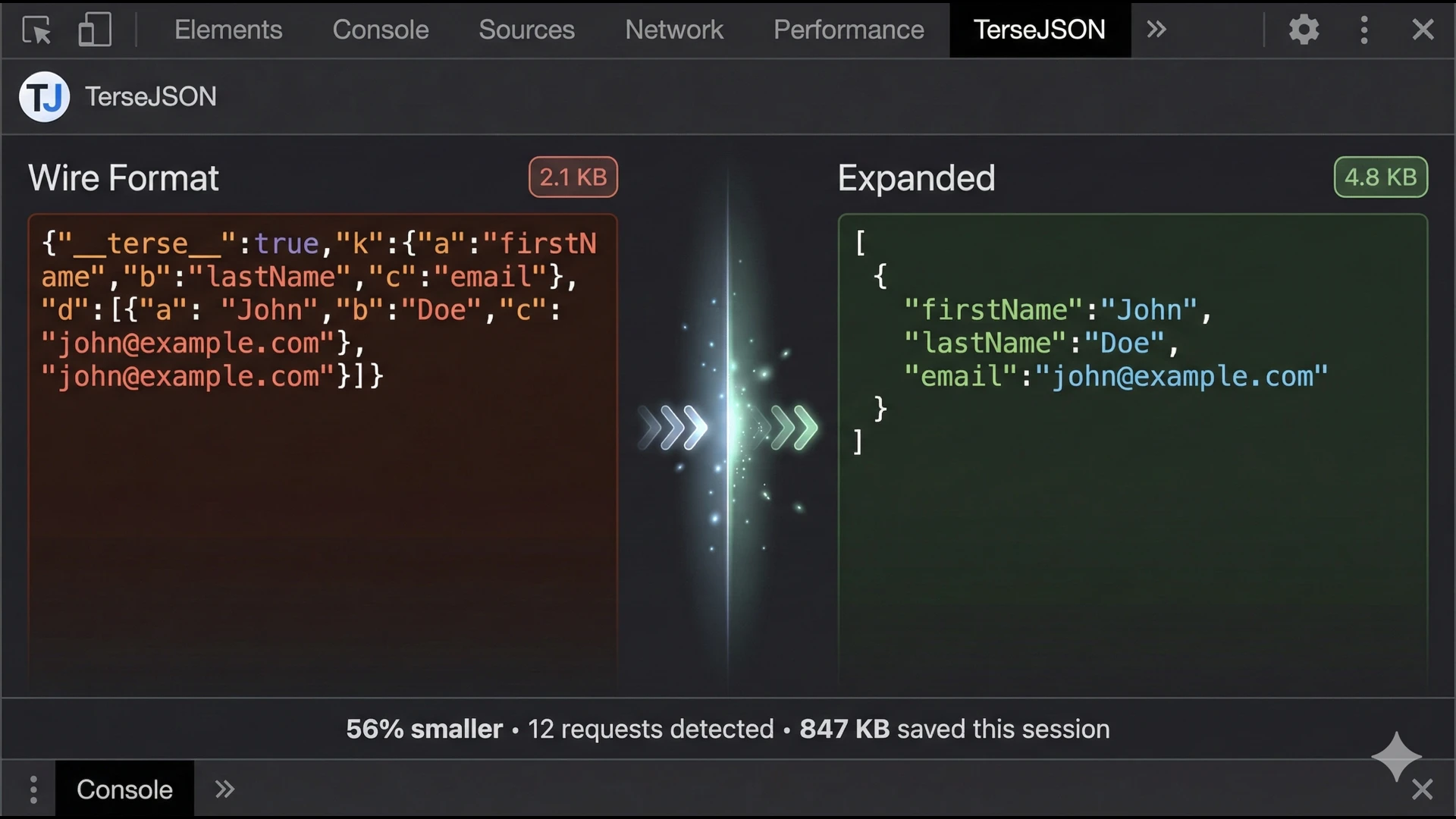
See TerseJSON compression in your DevTools. Watch payloads transform in real-time, inspect key mappings, and verify compression is working — all without leaving Chrome.
Frequently Asked Questions
Everything you need to know about TerseJSON and when to use it.